
Arise Webex Controller
The Marketplace advertises six Webex meeting controls and dials. This guide describes advertised behavior; feedback, view coverage and confirmation settings remain unverified against the released runtime. Check the meeting state in Webex.
- Arise Webex Controller
- 3 min read
- Checked on 25 October 2026
- By Arise Create
- Platform
- Windows
- Stream Deck software
- 7.0 or later
- Hardware
- Keys in the Stream Deck app
- Works with
- Cisco Webex
Requirements
| Need | Details |
|---|---|
| Operating system | Windows 11 (64-bit, Intel/AMD). Listed Windows 10 lacks guaranteed Stream Deck support. No macOS. |
| Stream Deck software | Version 7.0 or later |
| Hardware | Any Stream Deck with keys. The dials need a Stream Deck +. |
| Works with | Cisco Webex desktop app (Webex App). The browser version is not supported. |
| App language | English or German. Webex follows your Windows language setting (opens in a new tab). |
- Operating system
- Details: Windows 11 (64-bit, Intel/AMD). Listed Windows 10 lacks guaranteed Stream Deck support. No macOS.
- Stream Deck software
- Details: Version 7.0 or later
- Hardware
- Details: Any Stream Deck with keys. The dials need a Stream Deck +.
- Works with
- Details: Cisco Webex desktop app (Webex App). The browser version is not supported.
- App language
- Details: English or German. Webex follows your Windows language setting (opens in a new tab).
Setup
Install Arise Webex Controller from the Elgato Marketplace.
Drag the actions onto your keys. On a Stream Deck +, Toggle Mute and Toggle Camera can also go on a dial.
Open the Cisco Webex desktop app. Amber is advertised for no active meeting; confirm the meeting state in Webex.
Join or start a meeting. Check controls in Webex; feedback across full, minimised and sharing views has not been verified.
Actions
| Action | What a press does |
|---|---|
| Toggle Mute | Advertised: Mutes and unmutes your microphone. |
| Toggle Camera | Advertised: Turns your camera on and off. |
| Raise or Lower Hand | Advertised: Raises and lowers your hand. |
| Share Screen | Advertised: Opens the share picker. While you share, the same key ends the share. |
| Toggle Chat | Advertised: Opens and closes the chat panel. |
| Leave Meeting | Advertised: leave the meeting. Webex hosts may leave or end it for everyone (opens in a new tab). Plugin confirmation defaults and automatic confirmation remain unverified; check settings before use. |
- Toggle Mute
- What a press does: Advertised: Mutes and unmutes your microphone.
- Toggle Camera
- What a press does: Advertised: Turns your camera on and off.
- Raise or Lower Hand
- What a press does: Advertised: Raises and lowers your hand.
- Share Screen
- What a press does: Advertised: Opens the share picker. While you share, the same key ends the share.
- Toggle Chat
- What a press does: Advertised: Opens and closes the chat panel.
- Leave Meeting
- What a press does: Advertised: leave the meeting. Webex hosts may leave or end it for everyone (opens in a new tab). Plugin confirmation defaults and automatic confirmation remain unverified; check settings before use.
Key states
| On the key | It means | You do |
|---|---|---|
| Bright green | Advertised: The control is on: mic live, camera on, hand up, sharing, chat open. | Check the actual control state in Webex. |
| Dark green | Advertised: The control is off and ready. | Check the actual control state in Webex. |
| Amber | Advertised: Webex is running, but you are not in a meeting yet. | Join or start a meeting. |
| Red, white X | Advertised: Leave Meeting in a live meeting. | Check leave settings and any Webex prompt before confirming. |
| Grey | Advertised: Webex is closed, or does not offer this control in the current view. | Start Webex, or return to the full meeting window. |
- Bright green
- It means: Advertised: The control is on: mic live, camera on, hand up, sharing, chat open.
- You do: Check the actual control state in Webex.
- Dark green
- It means: Advertised: The control is off and ready.
- You do: Check the actual control state in Webex.
- Amber
- It means: Advertised: Webex is running, but you are not in a meeting yet.
- You do: Join or start a meeting.
- Red, white X
- It means: Advertised: Leave Meeting in a live meeting.
- You do: Check leave settings and any Webex prompt before confirming.
- Grey
- It means: Advertised: Webex is closed, or does not offer this control in the current view.
- You do: Start Webex, or return to the full meeting window.
Stream Deck + dials
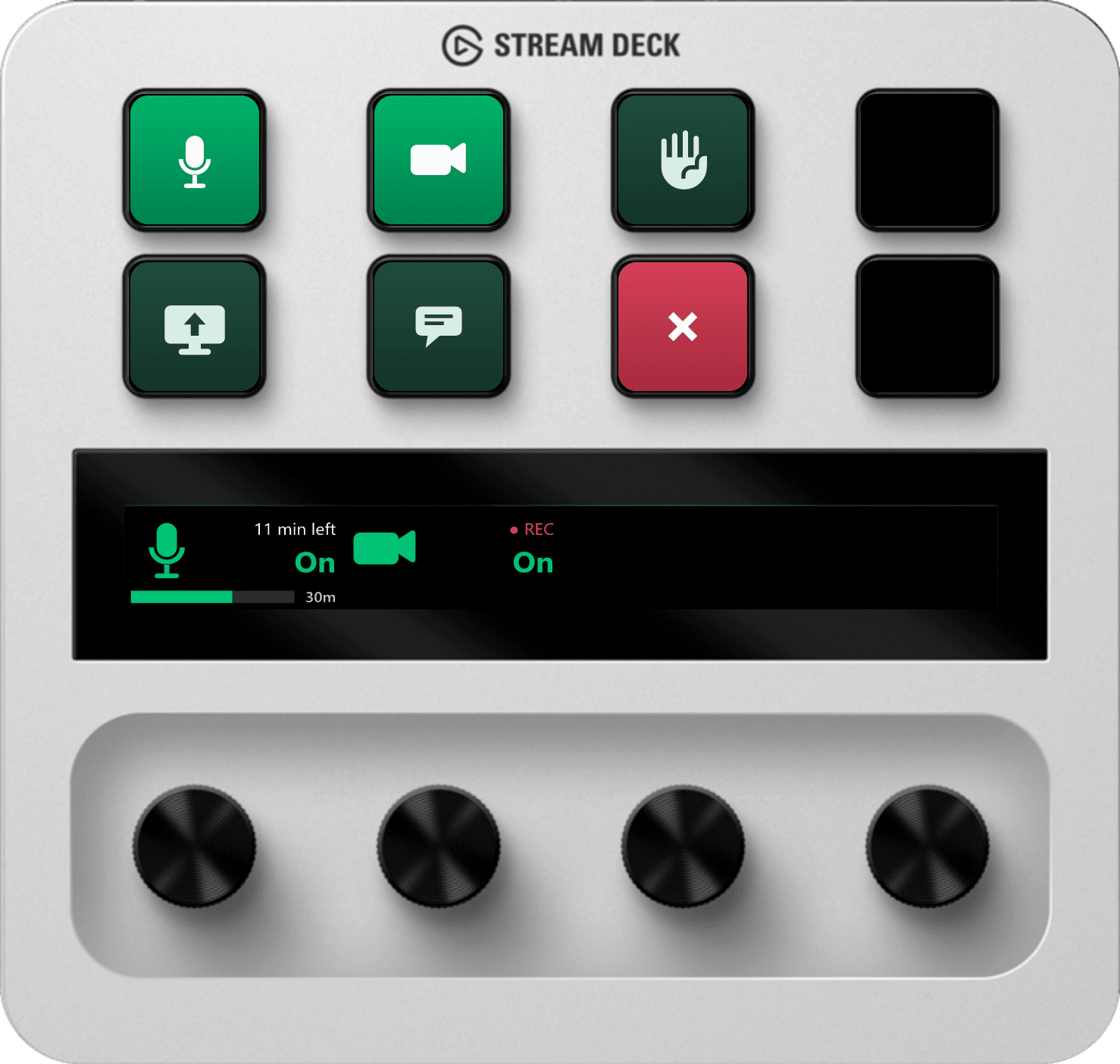
The Marketplace advertises mute/camera dials and the indicators below. Exact display and recording detection remain unverified against the released runtime.
| Dial | Advertised touch-strip display |
|---|---|
| Mute, scheduled meeting | The time left and a progress bar. |
| Mute, instant meeting | How long the meeting has been running, with a progress bar. |
| Camera | A red "● REC" while the meeting is recorded, "‖ REC" while recording is paused, and "Sharing" while you share your screen. |
- Mute, scheduled meeting
- Advertised touch-strip display: The time left and a progress bar.
- Mute, instant meeting
- Advertised touch-strip display: How long the meeting has been running, with a progress bar.
- Camera
- Advertised touch-strip display: A red "● REC" while the meeting is recorded, "‖ REC" while recording is paused, and "Sharing" while you share your screen.
Troubleshooting
| You see | Likely cause | Fix |
|---|---|---|
| Keys stay grey. | Webex is closed or not detected. | Start the Webex desktop app. If keys stay gray, restart Stream Deck and contact support. |
| Some keys are grey during a meeting. | Available controls depend on the Webex view. The plugin’s exact detection was not checked against its released runtime. | Return to the full meeting window. Cisco lists the mini window controls (opens in a new tab). |
| The mute dial shows no time left in a scheduled meeting. | The scheduled end time may be unavailable. | Check the meeting details in Webex. Contact support if remaining time is missing. |
| A key turns grey after a Webex update. | The update may have changed a control the plugin reads. Check Webex before relying on the key. | Restart the Stream Deck app. If the key stays grey, contact us so we can adapt the plugin. |
- Keys stay grey.
- Likely cause: Webex is closed or not detected.
- Fix: Start the Webex desktop app. If keys stay gray, restart Stream Deck and contact support.
- Some keys are grey during a meeting.
- Likely cause: Available controls depend on the Webex view. The plugin’s exact detection was not checked against its released runtime.
- Fix: Return to the full meeting window. Cisco lists the mini window controls (opens in a new tab).
- The mute dial shows no time left in a scheduled meeting.
- Likely cause: The scheduled end time may be unavailable.
- Fix: Check the meeting details in Webex. Contact support if remaining time is missing.
- A key turns grey after a Webex update.
- Likely cause: The update may have changed a control the plugin reads. Check Webex before relying on the key.
- Fix: Restart the Stream Deck app. If the key stays grey, contact us so we can adapt the plugin.
Still stuck? Contact us
Next steps
Product guide
Arise Teams ControllerProduct guide
Arise Slack Huddle Control
Arise Webex Controller
- Windows
- 7.0 or later
- Keys in the Stream Deck app
- Cisco Webex
Still stuck? Contact us